

Response Time Reduced By 60 Times After A Year With Orderry
4 January 2024

Orderry is appliance repair business software built for how your work actually runs — solo, in-shop, or across a team. Start fast and manage everything in one place from day one.

Track jobs and technicians without constant check-ins
Organize parts, brands, and warranty work easily
Invoice quickly and get paid right after the job is done


What convinced me to choose Orderry was that it didn’t feel like generic software. It was clearly built for appliance repair companies like mine, with features designed for work orders, field technicians, inventory control, and reporting. I felt like I wasn’t just buying another system, but adopting a tool built specifically for the way we work.

When bookings turn into phone tag, appointments overlap, and technicians keep calling for updates, your day quickly gets off track. Without clear visibility, it’s hard to keep jobs moving and customers informed.
Orderry’s appliance repair dispatch software keeps your schedule organized, your team aligned, and every job on track without constant coordination.

Drag-and-drop calendar to schedule jobs.
Online booking portal so customers can book without calling.
Automated appointment reminders to reduce no-shows.
Real-time technician tracking to see who’s where (coming soon).
Route optimization to cut travel time and fit more jobs in (coming soon).
With appliance repair booking software built around real workflows, your schedule stays under control, your team knows exactly what to do, and your day runs the way it should.
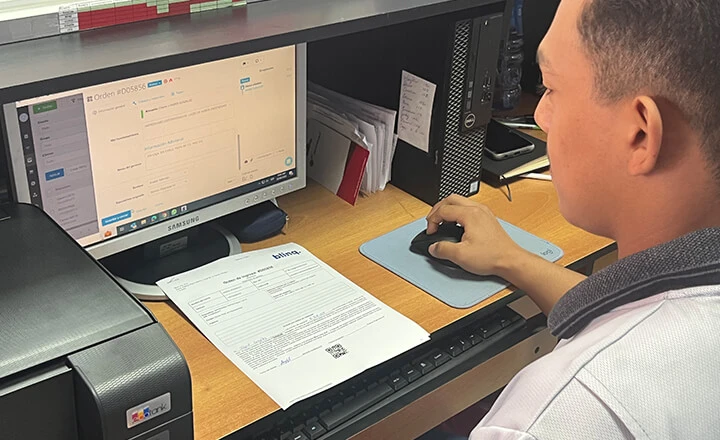
Paper work orders get lost, diagnostics go missing, and technicians end up relying on memory instead of clear records.
That slows repairs down and leads to missed details. Orderry keeps every appliance, every repair, and every detail in one structured record from drop-off to sign-off.
Digital work orders tied to each appliance and customer.
Diagnostic and repair notes easy to review at any stage.
Clear status stages from received to completed.
Photo and signature capture in the field with appliance repair field service software.
Automatic customer notifications as the job progresses.
With everything in one appliance repair service management software, your team works with clarity, and every repair moves forward without confusion.

Try Orderry Free
Create your first work order today. Get started in minutes.
Full access for 7 days. No credit card required.

Chasing payments, retyping invoices into QuickBooks, and fixing billing errors slow your cash flow down. When billing sits outside your workflow, getting paid takes longer than it should.
Orderry connects invoicing directly to your work orders, so the invoice is ready as soon as the repair is finished. With customer payments built into the appliance repair invoicing software, you can go from completed job to paid invoice in under a minute.
On-site digital invoicing the moment the job is done.
Card and online payments to get paid on the spot.
Parts and labour auto-filled from the work order.
Accounting sync without retyping.
Cash flow dashboard to track revenue in real time.
Automated reminders for unpaid invoices (coming soon).
Finish the job, send the invoice, and get paid with the all-in-one appliance repair business invoicing software.
The same customer calls about the same fridge, but no one remembers what was fixed last time. Without customer management software for appliance repair, you lose repeat business you already earned.
Orderry works as a purpose-built appliance repair CRM — every customer, every appliance, every past job in one place. Service reminders bring customers back to you before they think to search a competitor.
Customer profiles with full appliance history.
Warranty tracking per appliance.
Automated customer notifications.
Post-job follow-up sequences.
Calls, SMS, WhatsApp, and emails logged together.
Your team shows up prepared, and your customers feel it.

Orderry gave us control and clarity. Today, we know exactly how many active work orders we have, which technician is assigned to each job, what parts are in inventory, and how much we are billing. We no longer operate by reacting to chaos; we operate with planning and real data.

A missing part can turn a simple repair into a second visit. That costs time, money, and customer trust.
Orderry shows exactly what’s in stock, what’s needed for each job, and when to reorder. With accurate inventory management, your team shows up ready, and jobs stay on schedule.
Parts database by appliance brand and model
Per-job parts tracking
Low-stock alerts and auto-reorder
Purchase orders & vendor management
Truck and warehouse stock locations
Barcode scanning
See How Orderry Works for Appliance Repair
Book a personalized demo. No commitment, just a live 20-minute walkthrough.
Book a Demo
When technicians have to call for job details, rely on paper, or bring back notes at the end of the day, work slows down and details get lost.
Orderry keeps your field team connected and your data up to date, with everything handled from the technician’s phone.
Mobile work order app for iOS and Android
Digital work orders with photo and signature capture
Parts used added directly from the field
Appliance and customer history available on-site
Built-in time tracking
Built-in time tracking


Track revenue, costs, job profitability, and technician productivity with Orderry’s business reporting software.

Standardize service quality with custom checklists for every job type, ensuring your technicians follow the same steps consistently.

Handle pickups and walk-ins in the same system as your repairs. Take payments, sell parts, and issue receipts in seconds with the POS app.

Streamline daily work with the built-in AI tools: manage products and images, get call transcripts with summaries, and use sentiment analysis to spot happy customers and urgent issues.

Track technician hours without spreadsheets or manual logs. Clock in and out from the mobile app and keep accurate records for payroll and job tracking.

Discover the actual duration of repairs, from the initial visit to completion. Use real job data to plan schedules, improve estimates, and run your team more efficiently.

Instead of managing scheduling, parts, and payments separately, Orderry brings everything into one workflow that’s easy to follow and hard to break.
Look professional from day one
Replace notes and memory with a structured system that helps you stay organized, even when you work alone.
Every repair tracked, every invoice paid
Work orders, parts, and billing stay connected. Every repair moves through clear stages, and every job turns into an accurate invoice.
One system for office and field
Technicians and office staff work from the same data in real time. Updates, parts, and payments all stay aligned without calls or delays.
Try Orderry free for 7 days
Set up your workflow in one day. Guided onboarding included. No credit card required.
Not just appliance repair — Orderry runs service businesses of all kinds.
Frequently Asked Questions about Appliance Repair Software

Yes. Orderry replaces separate tools for scheduling, work orders, inventory, customer management, and invoicing in one system. If you're still on paper, you can move to a structured digital workflow without changing how your business operates.
Orderry handles the transition for you, including importing customer data, appliance history, and open work orders. Most shops switch in under a week, and you get guided onboarding with dedicated support to make sure everything is set up the right way.
Yes. Orderry has a mobile app that lets technicians access job details, update status, capture photos, collect signatures, and take payments on-site.
Yes. Orderry integrates with QuickBooks and Xero with two-way sync, so invoices, payments, and customer data stay aligned between systems without manual entry.
For anything not natively supported, you can connect Orderry via an open API or through Zapier to sync data with your accounting or other business tools. This way, your financial records stay accurate while your day-to-day work stays in one system.
Yes, Orderry works for solo technicians. There’s no minimum user count and no enterprise features you don’t need, so you can run your jobs, customers, and payments in one simple system without overcomplicating your setup.
As you grow, the same tool scales with you. When you hire your first technician, you can start assigning jobs, tracking work, and keeping your office and field work in sync.
Yes, Orderry supports both workflows in the same platform. You can handle drop-offs, pickups, and counter payments, while also scheduling field jobs and tracking technicians in real time. Everything stays connected in one system.
Orderry lets you track stock across warehouses and service vehicles, link parts to jobs, create purchase orders, and get alerts when inventory runs low.
Orderry features AI-powered product import, item recognition, background removal, call transcripts and summaries, suggested replies, and sentiment analysis.