 Mary
Mary
AI Automation for Auto Repair Shops
How Modern AI Tools Help Auto Service Businesses Work Faster and Increase Revenue
Table of Contents
What Is AI Automation for Auto Repair Shops (and Why It Matters in 2026)
Where Auto Shops Lose Time (and Money) Without Automation
AI Call Summaries and Sentiment Analysis (Turn Every Call into Actionable Data)
AI Customer Communication (Faster Replies, Fewer Status Check Calls)
AI Transcription for Voice Notes and Media (Reduce Rework, Keep Context)
AI-Assisted Inventory and Catalog Work (Product Recognition and Descriptions)
Online Booking and Scheduling Automation (Capture Leads 24/7)
Auto Repair Management Software with Built-in AI (What to Look For)
Mobile-First AI Automation for On-Site Work (Field and Mobile Mechanics)
What to Track (Simple KPIs to Prove ROI)
A 7 to 14 Day Start Small Plan (AI Quick Wins)
Frequently Asked Questions
Conclusion
Customers now expect quick communication, transparent vehicle updates, and a seamless repair experience from first call to final invoice. Meanwhile, your auto repair team is busy handling phones, job cards, estimates, and parts orders.
AI automation for auto repair shops is the practical answer to that pressure. Not robots, not hype. Just software doing the repetitive admin work so your team can focus on cars. This article covers the real use cases, the quick wins you can get running in two weeks, and the numbers worth tracking to know it is actually working.
What Is AI Automation for Auto Repair Shops (and Why It Matters in 2026)
For a working shop, AI for auto repair shops automation means your software handles the tasks your team currently does by hand.
Incoming calls are transcribed and summarized directly in the customer record, and customers receive automatic status updates as the job moves forward. A new part arrives, and instead of someone typing a catalog description from scratch, AI generates one from a photo.
None of that touches the repair work itself. AI tools for mechanics are built into the same software shops already use for job tracking, invoicing, and scheduling. The point is straightforward: less time on admin, more time on cars.
Workshop automation and garage automation are used as broad terms that can mean anything from a simple message template to a fully automated booking system. For a real shop, the useful version sits somewhere practical. Tools that automate routine work, maintain steady customer communication, and flag the situations that require a human touch.
Where Auto Shops Lose Time (and Money) Without Automation
Most shop owners know time is getting lost. Figuring out exactly where is harder.
Before Orderry, our work order management was a complete mess. When a client called asking about their vehicle’s service history, it was a nightmare. We’d dig through papers for hours, sometimes coming up empty-handed. It was frustrating for them and for us.

- Missed calls → lost leads and incomplete intake details during rush hours.
- Slow estimates → lower close rates because customers move on to the next shop.
- Status-check calls → constant interruptions that pull staff away from real work.
- No-shows → wasted bays and dead schedule time that you can’t recover.
- Unpaid invoices → cashflow drag when follow-ups happen late or not at all.
- Parts errors → delays and margin loss from manual entry, wrong items, and reorders.
- Spreadsheet scheduling → double-bookings and blind spots that proper job scheduling software is designed to prevent.
This is why shops that still rely on manual processes are leaving money on the table.
AI Call Summaries and Sentiment Analysis (Turn Every Call into Actionable Data)
The phone remains the main way customers reach most repair shops. What needs to change is not how calls happen but what gets captured when they end.
AI call transcription converts the recording to text straight away. The system generates a short summary of what was discussed, what the customer described, and what was promised—and saves it in the customer record without anyone typing a word. After each call, you should be able to see:
- the customer’s problem in plain language (what they heard, smelled, or noticed)
- the agreed next step (estimate, booking, inspection, callback)
- any timing expectations (urgent, “today,” “this week,” preferred appointment window)
- a sentiment flag when the tone suggests frustration, confusion, or urgency
That’s how call details stop living on scraps of paper and start turning into clean, trackable follow-ups.
Sentiment analysis runs alongside it. When a customer's language or tone suggests frustration, the system flags it so a manager can step in before a bad review gets written.
Here is what that looks like in practice. A customer rings about a grinding noise from the front brakes. The call is transcribed and summarised automatically. The service advisor reads the note, checks the vehicle history, and sends an estimate within fifteen minutes.
The customer approves it from their phone that afternoon. The job is on the board before the close of business. No handwritten notes. No missed details. No follow-up call needed to fill gaps that should have been captured the first time around.
AI call summaries for auto repair are one of the fastest wins available because they require no change to how your team handles calls. The workflow stays the same. The Orderry’s software just makes sure nothing important gets lost at the end of it.
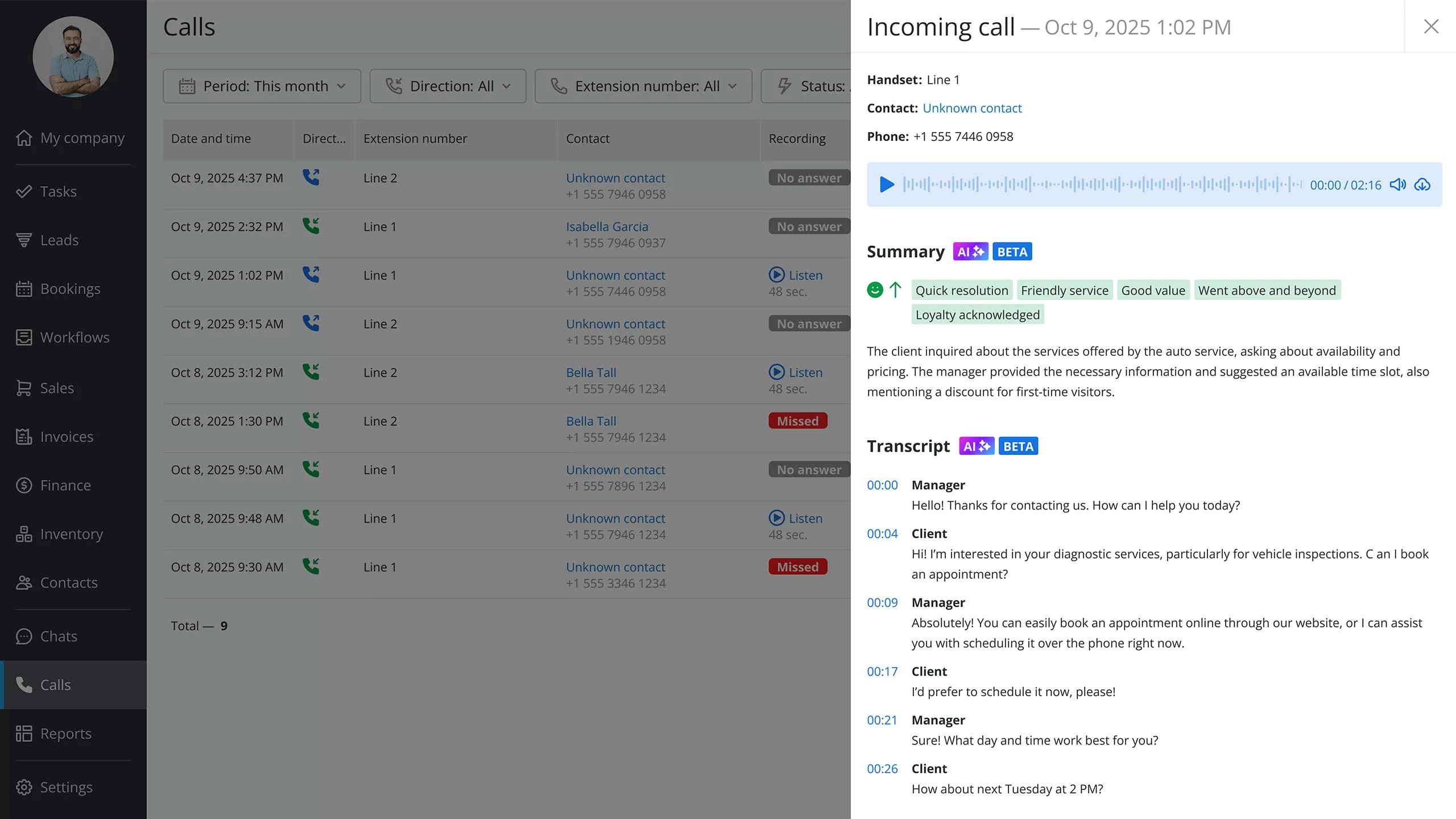 AI call summary and sentiment tag in Orderry customer communication software
AI Customer Communication (Faster Replies, Fewer Status Check Calls)
Most shop communication is reactive. Customers ring because nothing has been sent to them. Staff scramble because the job status in the system is two steps behind where it should be. Everyone is working with information that is already out of date.
AI-powered customer communication changes the flow. When a job status changes, a message goes to the customer automatically. Car dropped off, message sent. Work started, message sent. Car ready, message sent with a payment link. None of it needs a human to initiate.
When customers message in, AI-assisted replies help staff respond quickly and consistently. Instead of three different people giving three slightly different answers about the same job, the communication stays clear regardless of who is working.
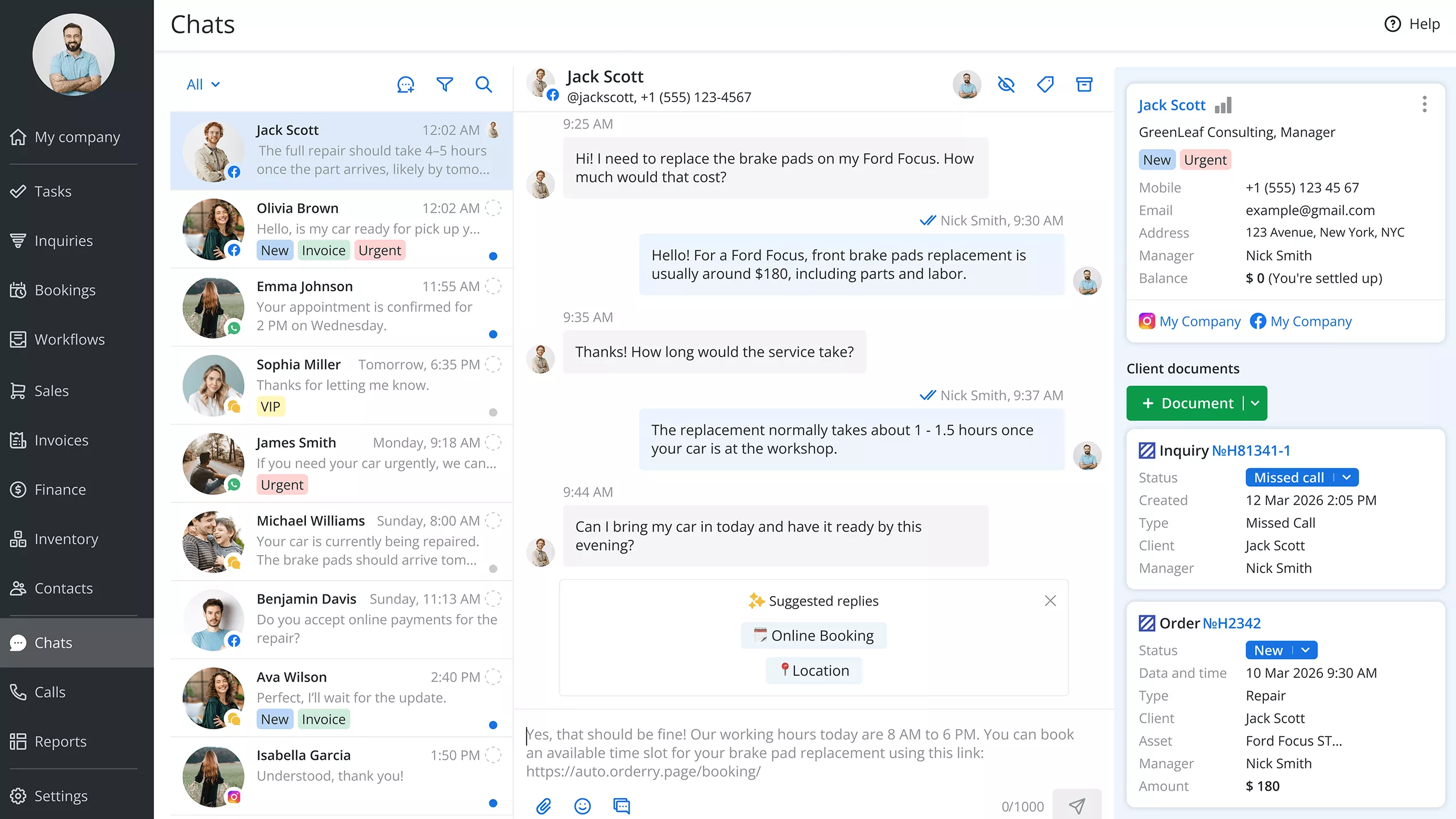 AI suggested replies in Orderry chats
Automated review requests and post-service follow-ups run in the same system. A day after pickup, a message goes out thanking the customer and prompting a review. No manual process, no one needing to remember.
Shops using dedicated customer communication software for these workflows see faster response times, higher review volumes, and a real reduction in unnecessary inbound calls.
AI Transcription for Voice Notes and Media (Reduce Rework, Keep Context)
There is a category of useful information in every shop that almost never ends up in the right place. A technician records a voice note about an unusual wear pattern. A photo gets sent over a chat app to show a cracked CV boot. A short video captures the noise a customer complained about. All valuable. Rarely filed anywhere useful.
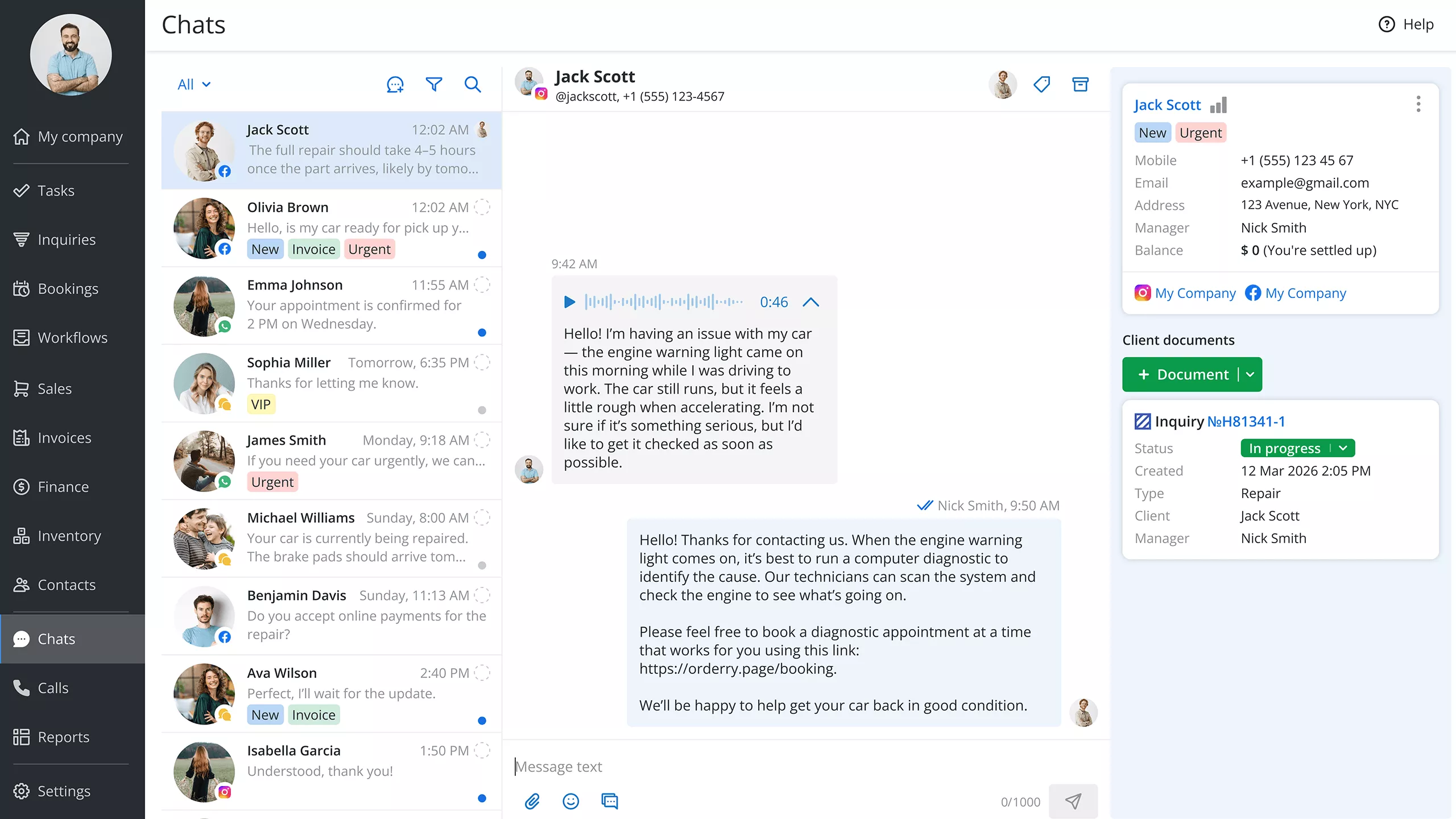 AI voice message transcription in Orderry chats
AI transcription turns voice notes into text so the details don’t get lost. Your team can still paste the transcription into the work order notes when needed, which keeps the context in the same place as the job, not buried in a recording or a chat thread. The technician speaks, the system writes it down, and anyone picking up that job later has the full picture without hunting for a recording or interrupting the technician mid-job.
For jobs running across multiple days or multiple technicians, this matters a lot. Complete notes in the right place mean faster handovers and fewer repeated inspections. A small operational change that compounds across every job that comes through the door.
AI-Assisted Inventory and Catalog Work (Product Recognition and Descriptions)
Manual parts data entry is slow and easy to get wrong. Part numbers get transposed. Descriptions get copied from memory. Catalog updates pile up because nobody has a spare hour to work through them.
AI-assisted product recognition can speed up catalog entries by generating descriptions from photos, reducing manual typing and mistakes. New stock gets added faster. The catalog stays current. Fewer gaps mean faster estimates because service advisors can find what they need without ringing the warehouse.
The downstream effect is where it really counts. Fewer parts errors means fewer jobs held up waiting on the correct component after someone ordered the wrong one. Shops investing in inventory management software with AI assistance see those gains show up directly in job margins and in fewer customer complaints about delays.
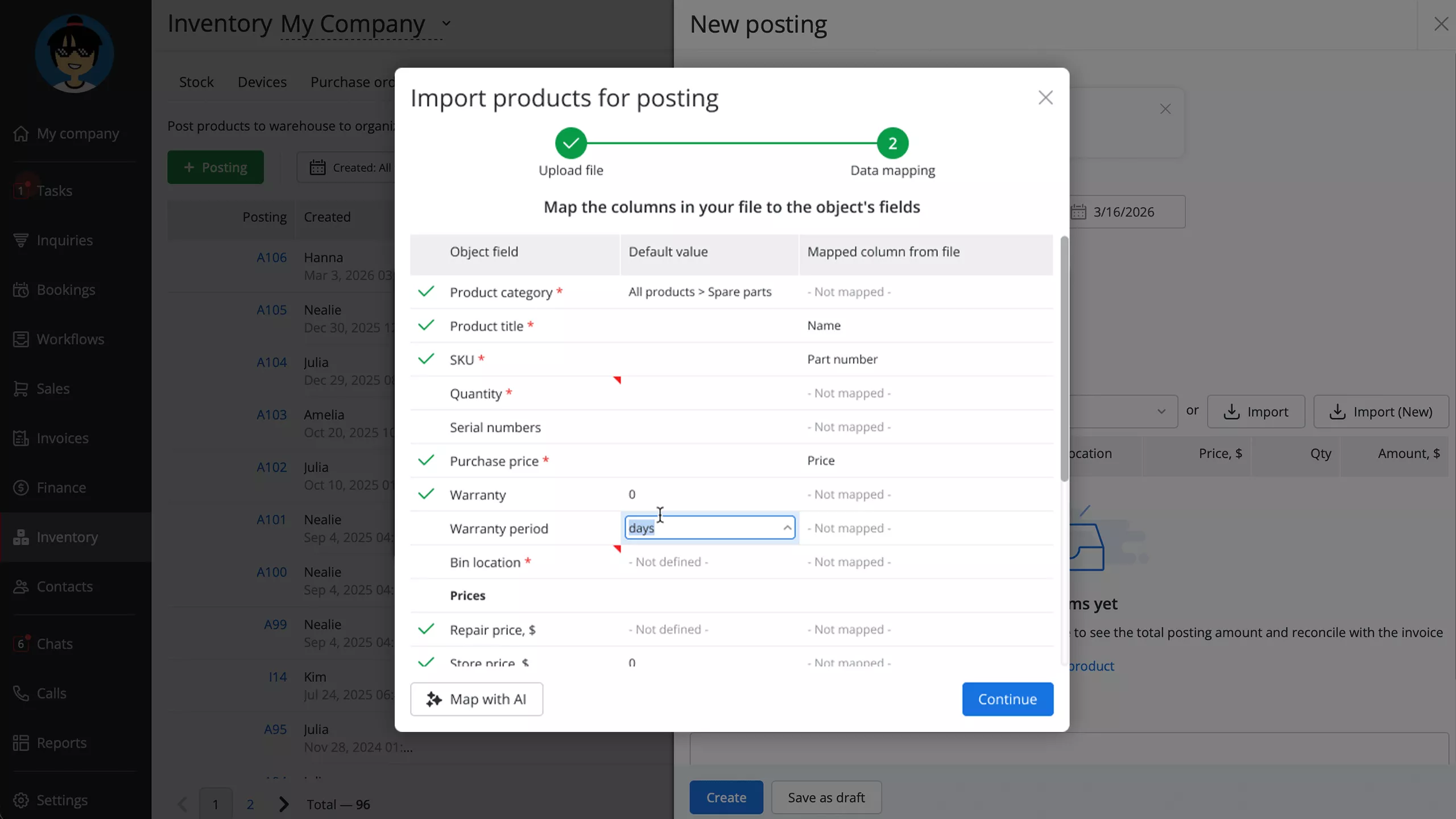 AI-assisted product import in Orderry inventory management software
Online Booking and Scheduling Automation (Capture Leads 24/7)
A customer decides they want to book a service at 9 PM. Your shop closed three hours ago. Without online booking for auto services, they either wait until tomorrow or find a competitor whose booking page is live right now.
The automation layer is what makes online booking genuinely useful. Confirmations go out the moment a booking is made. Reminders go out the day before. If the customer needs to reschedule, they handle it without ringing the shop. All of that runs without any staff involvement and cuts no-shows in a way that shows up clearly in the numbers within a few weeks of going live.
There is sometimes an inflated idea of what "AI booking" means in practice. A practical setup includes a booking page available at any time, connected to real availability, and automated follow-ups that keep customers engaged and showing up. Pair it with digital estimates and approvals to eliminate common slowdowns.
Auto Repair Management Software with Built-in AI (What to Look For)
Most shop management platforms include some automation. Fewer have AI tools for auto repair shops that are genuinely built into the core workflow rather than bolted on as extras.
When evaluating auto repair management software, look for platforms where AI supports what your team already does. Call transcription saving summaries to customer records. AI-assisted messaging within the same inbox that staff use daily. Product recognition feeding into existing inventory. Mobile access that actually works for a technician in the bay.
Look closely at how automation for auto service triggers work. Good auto repair shop software lets you define when messages are sent, when estimates go out, and when payment links follow a completed job, without needing outside help to configure each step. If a basic status update trigger requires a call to support, the feature was not designed with working shops in mind.
When we implemented Orderry, it took our technicians three days to move along with the new software. And that's it. The training was over. They got it really quickly, and everything was running smoothly in the first week.

Want to see these AI workflows in action? Book a demo and walk through a real job — from the first call and estimate approval to payment and follow-ups.
Mobile-First AI Automation for On-Site Work (Field and Mobile Mechanics)
A mobile mechanic's office is a driveway or a car park. No front desk, no desktop, nobody else handling admin while the job is being done. For on-site auto repair workflows, mobile-first software for auto repair is not a preference. It is the only option that works.
AI productivity tools for mechanics on a phone change what is possible when working alone. Voice-to-text captures job notes without stopping work. Photo capture feeds into parts identification. Digital estimates get sent and approved before the next job starts.
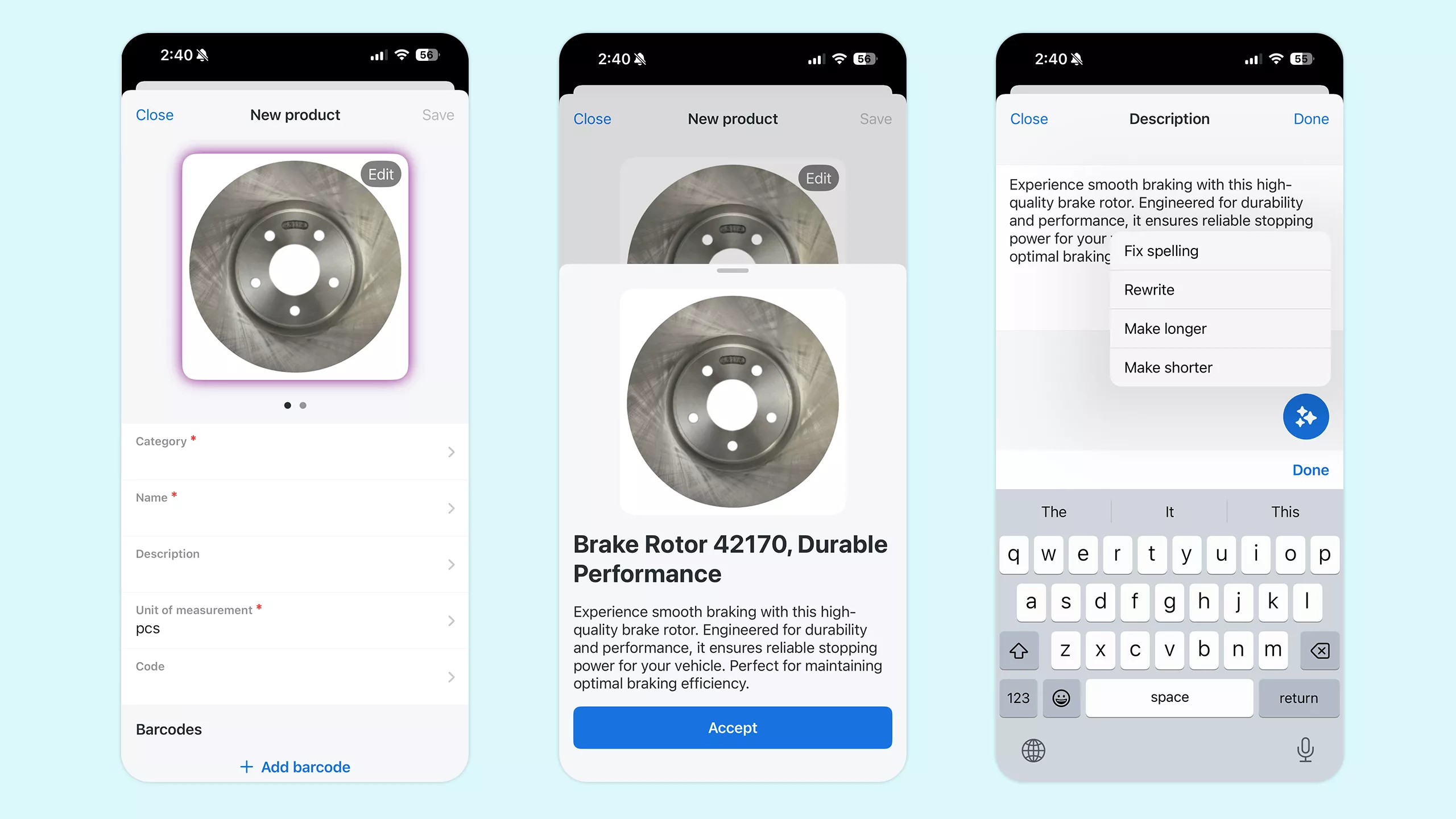 AI product recognition by photo in Orderry mobile app
Mobile mechanic software with these capabilities lets on-site teams run at the same standard as a fixed workshop. Customers get professional communication. Records stay accurate. Invoices go out the same day the work is done.
Mobile work order app management ties it together. When technicians handle updates and task completion from their phones, the system stays accurate, and there is no stack of paperwork waiting later.
What to Track (Simple KPIs to Prove ROI)
Automation takes time to set up, so it is worth knowing which numbers tell you whether it is paying off.
- Missed calls + response time → the fastest indicator that customer communication is improving.
- Estimate-to-approval time → shows whether your quoting process has momentum (and whether nudges work).
- No-show rate → should drop once reminders and confirmations go live.
- Cycle time (job start → invoicing) → reveals bottlenecks, usually in approvals or communication rather than repairs.
- Invoice close rate + overdue invoices → proves whether payment links and follow-ups are working.
- Repeat visits + review volume → slower signals that confirm better customer experience over time.
A business insights app with a mobile KPI dashboard makes it easier to check these throughout the day instead of waiting for end-of-week reports.
Before using Orderry, I needed to be present in my company all the time. And now, I can leave my business for a holiday and track it remotely. I can stay in touch with customers and manage bookings from anywhere. I can monitor multiple locations and see employee activity in real time. This has greatly improved my efficiency in managing my business.

A 7 to 14 Day Start Small Plan (AI Quick Wins)
Avoid automating everything at once. Start small, refine, then expand.
Week one: Enable call transcription and summaries, create update templates, and launch online booking. Those three things will reduce missed information from calls, cut inbound status-check calls, and start pulling in bookings from customers searching outside business hours.
Week two: Turn on automated status updates tied to job stages, set up digital estimate delivery with an online approval link, add payment links to job completion messages, and create a review request automation that sends a couple of days after pickup.
By the end of that fortnight, your shop is running an auto service automation workflow that most competitors are still handling manually, call by call, person by person. The work order software you build this on should make each step straightforward to configure without outside help.
Frequently Asked Questions
Is AI worth it for a small auto repair shop?
Yes. Auto repair shop automation works regardless of shop size. The tools that matter most, call summaries, status updates, and booking reminders, do not require a large operation to justify.
What is the easiest AI automation to start with?
Call transcription and basic message templates are the fastest to set up and quickest to show results. They require no change to how your team operates. The calls happen exactly as they always have. The software just makes sure the information ends up somewhere useful rather than on a scrap of paper.
Can AI reduce missed calls?
AI does not pick up the phone for you, but AI transcription for auto repair means every call your team takes becomes a complete, searchable record. Even vicemails, so nothing falls through the cracks.
How do I measure ROI from automation?
Record where your key numbers sit before you change anything. Then check them four weeks after your automations go live. Response time, estimate approval time, no-show rate, and invoice close rate all tend to move quickly and give a clear picture without needing complex reporting.
Does AI replace mechanics?
No. Diagnostics and repairs require skilled technicians, and that is not changing. AI handles the admin layer: transcription, messaging, scheduling, parts descriptions, and follow-ups. The purpose of AI automation for auto repair is to make sure your technicians spend their time on the work only they can do.
Conclusion
Less admin, faster turnarounds, better customer experience, more closed jobs — that’s what auto repair shop automation delivers when it’s built around real workflows. You don’t need to overhaul everything to see results. Pick two automations this week, watch the numbers, and expand once the first ones are running smoothly.
You do not need to overhaul everything to see results. Pick two automations this week. Watch the numbers. Add more once the first ones are running well. The shops seeing steady growth right now are the ones that have stopped doing manually what their auto repair management software should be handling for them.
Solid automated customer updates tend to be where shop owners notice the return first: fewer unnecessary calls, faster approvals, and customers who feel looked after from the first call to the final invoice.